All Plugins
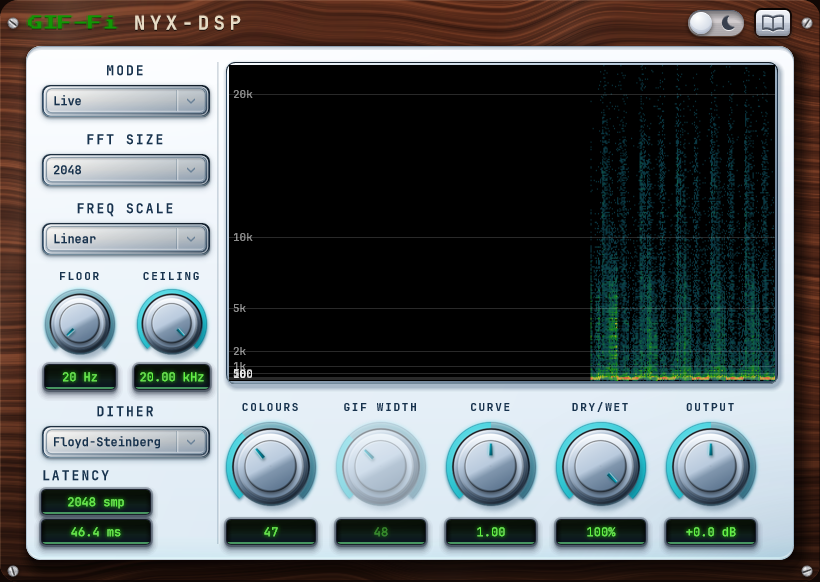
Gif-Fi plugin interface, light theme

Gif-Fi

The spectral crusher you never knew you needed

Ever wonder what would happen if you ran your audio through a GIF encoder? Well, wonder no more!

Gif-Fi translates your incoming audio into a spectrogram, subjects it to brutal image compression, and resynthesizes the mangled picture back into sound. It’s not a bitcrusher, tape simulator, or vinyl emulation - it’s pure visual destruction applied directly to your signal.

From dusty lo-fi textures and gritty digital warmth to completely unhinged metallic artifacts, Gif-Fi gives you complete control over every aspect of the image-mangling process.
The sound of GIF compression

Gif-Fi largely works via palette quantisation, the same technique that makes an over-compressed GIF image, and dither. Each spectrogram slice (Live mode) or buffered image (Windowed mode) has its brightness snapped to a handful of levels, and Dither smooths those hard steps with noise.

Live mode crushes one spectrogram slice at a time for a lower latency effect, while Windowed buffers a block of slices into a 2-D image first and builds a single palette across the lot, the way a real GIF encoder would. Each has a distinct sonic character that produces completely unique results.

Download the User Guide (PDF) →

A pixel-art black cat

FAQ

Does Gif-Fi require an iLok or dongle?

No. Activation is handled online through a license key, with no dedicated hardware required.

What's the difference between Live and Windowed mode?

Live crushes one spectrogram slice at a time with an evenly-spaced palette - the lowest latency. Windowed buffers a block of slices into a 2-D image and builds one adaptive, median-cut palette across the lot, the way a real GIF encoder works - smoother, but with more latency.

Does Gif-Fi add latency?

Yes - more with a larger FFT size, and more again in Windowed mode. Any host with delay compensation handles it automatically. Live tracking through Gif-Fi is not recommended.

Why doesn't the Dry/Wet blend cause phase cancellation?

The dry signal is delay-matched to the wet before the two are summed, so blending them together stays phase-coherent instead of comb-filtering.

How many machines can I activate it on?

Up to 3 devices per license. Moving to a new machine is free: deactivate on the old one and activate on the new one, with a 14-day cooldown before that license can go back on the device you removed it from.

Is there a demo version?

Yes, a free 7-day trial with full audio functionality. Try it in a real session before you buy.

What is the refund policy?

Try the demo first. Once a license is activated the sale is final, but if the plugin is faulty or something was billed incorrectly, get in touch. Full details on the Refund Policy page.