All Plugins
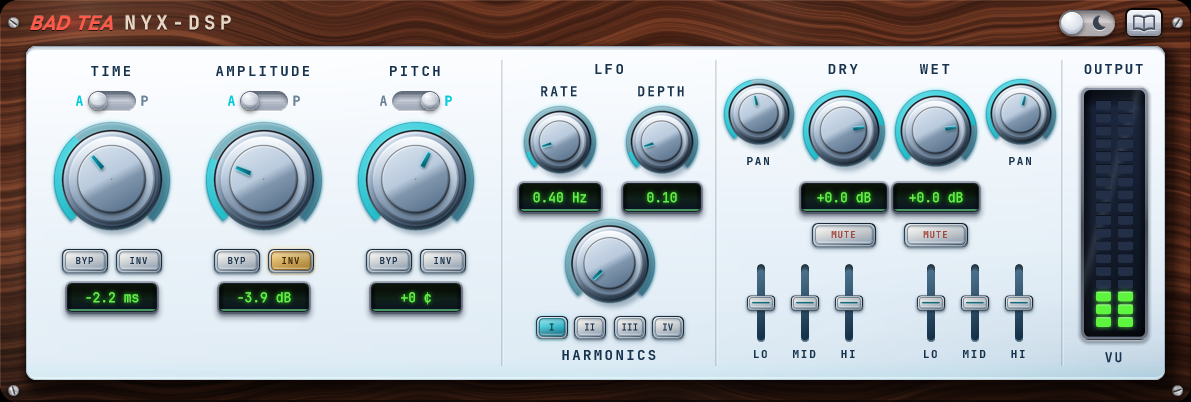
Bad Tea plugin interface, light theme

Bad Tea

Does funny things to your voice

When we set out to build Bad Tea, we envisioned a modern approach to ADT. Since Ken Townsend developed the effect that became the saviour of John Lennon and countless vocalists since, the approach has hardly changed. Even in the digital realm we've seen very little innovation in approach, and the most popular plugins remain emulations of the Abbey Road equipment used way back when.

That changes now though.
The double that listens

Bad Tea’s big step forward is responsive movement. Instead of being absolute or pre-programmed, it uses a sensor array to continuously analyze your incoming audio. This steers the wet signal in real time and creates a dynamic double that moves organically. Bad Tea is constantly reacting to what you feed it, moment to moment.

But we didn't stop there. Bad Tea is an evolving beast. An LFO was added for classical movement on top, four tape-inspired colouration models add grit, and both paths get full level, pan and EQ shaping. Now this Multi-FX monster provides endless possibilities. Applied subtly it does its original job beautifully. Pushed hard it choruses, crunches and completely reshapes almost any source.

Download the User Guide (PDF) →

A black cat drinking tea

FAQ

Does Bad Tea require an iLok or dongle?

No. Activation is handled online through a license key, with no dedicated hardware required.

Why is Bad Tea summing my signal to mono?

By design. Bad Tea sums its input to mono before processing, so any wide stereo effect placed before it in the chain gets folded down first. Add stereo effects (reverb, widening) after Bad Tea rather than before it.

Does Bad Tea add latency?

Yes, a fixed amount, which the plugin reports to the host. Any host with delay compensation handles it automatically in the mix. Because of that latency, tracking live through Bad Tea is not recommended; insert it afterwards instead.

The Harmonics buttons click when I switch models mid-playback. Is that normal?

Yes. Each of the four tape models is a different drive structure, so switching between them while audio is passing through can produce an audible click. Switch during a pause in the material for a clean transition.

How many machines can I activate it on?

Up to 3 devices per license. Moving to a new machine is free: deactivate on the old one and activate on the new one, with a 14-day cooldown before that license can go back on the device you removed it from.

Is there a demo version?

Yes, a free 7-day trial with full audio functionality. Try it in a real session before you buy.

What is the refund policy?

Try the demo first. Once a license is activated the sale is final, but if the plugin is faulty or something was billed incorrectly, get in touch. Full details on the Refund Policy page.